Featured Photographer: Mario Rojas

Your Name: Mario Rojas

Type of Camera:  Canon EOS 5D Mark III

What do you love to photograph the most? I love shooting boxing and my kids soccer games the most. I like taking action shots and anything having to do with my kids and family. I have taken an interest to studio lighting after taking that class with Kevin Gourley. I wish I had more time to do this type of photography to get better at it. I have taken some pictures of boxers with studio lights on my own and they came out ok. I tried to remember everything Kevin showed me but I found out I still need more work at it.

What is one thing you have learned that has improved your photography?   I have learned to shoot in manual mode which is all I shoot in now. By taking a few classes I have learned to post process better than I used to and of course lighting. The most important thing I have learned though is taking sharper pictures. I go back to when I first started taking pictures a couple of years ago and I thought my pictures were great. I now look at them and realize how wrong I was.

Advice you’d give to others wanting to grow in their photography skills: The advice I would give others is practice, practice, practice and if you are still struggling take classes from Kevin Gourley. The best thing I ever did was start taking his classes and what a difference it has made.

Share

Featured Photographer: Tom Hausler

Your Name: Tom Hausler

Type of Camera:  Canon EOS 6D and Canon EOS 7D Mark II

What do you love to photograph the most?  I started out photographing only birds.  And since my interests are outdoors and nature,  I now shoot landscapes, nature, wildlife and birds. I am focusing on landscapes at the moment.

What is one thing you have learned that has improved your photography?   Shooting in Shutter Priority to freeze birds and wildlife in motion.  And learning post processing skills in Lightroom, Aurora and other photo software to get the look you want.  

Advice you’d give to others wanting to grow in their photography skills:  Be creative, try different settings on your camera and process the images using different software.  It is your image and art form, so make it unique.  Get familiar and learn your camera;  test different shooting options before going on a photo tour.

Share

When Changing Lenses

If you own more than one lens, be careful when you switch to the other lens! Try to work quickly. The longer you have your lens off your camera, the more time there is for dust to drift into the camera body, and that dust eventually can work its way onto the sensor. Sensor dust then becomes visible in your images!

If at all possible, keep your camera pointed downward as you change lenses, so gravity is at least working in your favor, pulling dust away from your camera. Also shield your camera from wind if you absolutely have to change lenses on a windy day. Watch out, though.  Just shielding your camera from the wind doesn’t magically mean the air is clean and dust free.

The absolute worst place to change lenses is at the beach. That sandy salty humid air is just bound to get junk inside your camera and eventually onto your sensor. I would say avoid doing that at all costs.

I’ve seen some people claim that it is important to turn off your camera before you change lenses. I have checked with numerous experts who all say it is NOT an issue to worry about.  You don’t have to turn off your camera to change lenses. If you have any concerns about your specific camera, check your user manual.  I don’t think it’s a problem, though, at least from what I have been told.

Oh another point. If you ever sit the camera or lens on the ground, you’ll get dirt and dust on the bottom of the camera or lens, making it even more likely to get dust inside your camera and eventually on the sensor. You’re better off sitting the camera on a table, a bench, a chair, concrete, a rock, anything but on dirt!

And for the lens you put away in your camera bag, make sure you put a CAP on the back!  Never just put a lens in your camera bag without a cap on the back camera mount. That will just get dust inside the lens and the next time you mount that lens on a camera, you’ll just transfer the dust into your camera!

What does sensor dust do to an image? I shows up in your photographs as little dark spots, sometimes very tiny, sometimes fairly big.  How crisp and well-defined the spots are depends on what aperture you are using. The higher the f/stop, the more well-defined the sensor dust appears to be. At lower f/stops, the dust is more soft.

Here’s a waterfall photo that has sensor dust on it.

I have circled some of the sensor dust I noticed.  And here is an enlarged section so you can see it more clearly.

THAT is what you are trying to avoid by exercising care when changing lenses!

Eventually the sensor dust becomes enough of a problem that you will have to get your sensor cleaned.  You could take your camera to a local camera store, or send it off to your camera manufacturer for cleaning. You can also buy special swabs and other tools for cleaning the sensor yourself. Exercise caution when doing that.  You really need to research that carefully to ensure you don’t damage your camera. I am not saying you shouldn’t clean your own sensor. I do it all the time. Just make sure you know what you are doing before you try it!

At least do what you can by reducing the dust that gets into your camera in the first place.  Start by practicing good lens-changing habits.

Happy Lens Changing,

Kevin Gourley

Share

Featured Photographer: Terry Brim

Your Name: Terry Brim

Type of Camera: Canon 7D Mark II

What do you love to photograph the most?  For many years 95% of what I photographed was soccer and lacrosse players on our kid’s teams.  Now that they’ve moved beyond high school and are no longer involved in sports I have time to shoot other things.  My interests are broad and I have no particular favorite.  I enjoy landscapes and nature, wildlife, cityscapes, night skies (using a star tracker to capture Milkyway images), macro, and most recently aerial shots of sunrises and sunsets captured by way of a drone.  I’m enthralled with the possibilities that drones provide to capture images from many different points of view.

What is one thing you have learned that has improved your photography?   Know your subject.  If you’re shooting a sporting event know the rules of the game, learn the tendencies of the players so that you can anticipate where they might kick/pass a ball so that you can have your camera pointed in the right location to capture imminent action.  Know rising and setting times of the sun and moon to plan landscape and cityscape shots.  Know the times of the new moon when the skies are darkest and when the galactic core is visible for planning Milkyway shoots.

Advice you’d give to others wanting to grow in their photography skills:  Take lots of pictures.  Experiment with your camera and lenses.  Make changes to the exposure triangle by varying aperture, shutter speed, and ISO to learn how those changes are related and how they effect the depth of field, sharpness, and noise in your images.  Capture your subject from different points of view; shoot high, shoot low, shoot from the left, shoot from the right.

Share

I Love My LensPen Lens Cleaner

This nifty device, called a “LensPen” is a wonderful device for keeping your lens clean! I always have one in my camera bag.

One end has a retractable brush and the other end is a felt tip with a protective cap. It has a special cleaning compound that does an excellent job of cleaning the front of your lens. Keeping your lens clean is important, especially when you shoot toward the sun. Dust, dirt, and smudges really can harm the quality of your photographs.

Share

Featured Photographer: Sara Bogan

Your Name: Sara Bogan

Type of Camera: Nikon D610

What do you love to photograph the most?  People. I love capturing the smiles of pure happiness. I also love to photograph the beauty in everyday spaces.

What is one thing you have learned that has improved your photography?   Kevin has a great class on Lightroom where you learn to make your pictures pop with just a few clicks. It also takes away some of the stress during the shoot since you can fix so many things on the backend.

Advice you’d give to others wanting to grow in their photography skills:  1) Take Kevin’s classes.   Some people are great photographers and others are good instructors. Kevin is unique in that he is awesome at both! 2) Theodore Roosevelt said, “Comparison is the thief of joy.” Don’t compare yourself to other photographers. Do and shoot what makes you happy. 3) Be brave and put your work out there for everyone to enjoy.

Share

Featured Photographer: Robin Krumme

Your Name: Robin Krumme

Type of Camera: Nikon D7000

What do you love to photograph the most?  Whatever I’m photographing at the time!  Flowers, teenagers sitting for their senior portraits, my kids playing basketball.

What is one thing you have learned that has improved your photography?   Lightroom!  Even if I mess up a photo, if I love it enough I can do something fun with it in Lightroom.

Advice you’d give to others wanting to grow in their photography skills:  That’s easy. . . .Take classes from Kevin!

Share

Light & Photography Workshop – Why It Is Right For YOU!

I have a Light & Photography Workshop starting soon and I want to make SURE you consider joining us!

You can master the camera settings, exposure modes, aperture, shutter speeds, depth of field, focal lengths, and still take a bad photo! What I cover in my Light & Photography Workshop is absolutely essential for every photographer who wants to create better images. Yes, you need to learn about your camera first, but in this Workshop we explore the world of LIGHT and the importance of mastering the use and manipulation of light to create better images.

Especially, if you have taken my Photography 101 Workshop or my Photography: Mastering the Fundamentals Class, I wholeheartedly urge you to consider signing up for the Light & Photography Workshop that’s coming up on:

Whether you are a portrait photographer or you like nature and landscape photography, LIGHT is the ESSENTIAL ingredient common to all photography. If you use the techniques I show you in this class to more effectively use light in your images, your photography will improve!


  • Learn how to take great shots even in “bad light” conditions.
  • Frustrated with your flash photography? You’ll learn how to create great flash photographs.
  • Improve all of your photographs through improved lighting techniques
  • Get creative! Have fun using light in all sorts of creative ways to produce stunning results.
  • This class is a mix of classroom instruction combined with live demonstrations, hands-on activities and class projects, and homework.

Also, a real bonus is the Studio Lighting Add-On Session which you can sign up for if you take this class!  You will have a chance to take your own great images with a professional model in my studio using my studio lighting, with my help!

Students are Saying:

  • I thoroughly enjoyed Kevin’s Light & Photography Workshop. The classroom sessions struck a nice balance of academic lessons that answered many questions and explained principles that I was aware of but didn’t fully comprehend and demonstrations of those principles. It was enlightening and refreshing to get clarity! I also found it invaluable to setup and work with my own equipment in the studio while Kevin guided the discovery process. After taking the class, I understand light better, and most importantly, improved my photography. Thanks, Kevin!” -Mike Johanns
  • Kevin is an amazing teacher. Love that the classes were small enough that it was almost like having a private tutoring lesson. He encouraged us to ask questions, and was extremely knowledgeable in giving us answers and or solutions to them. I would definitely recommend one of his classes. I’ve felt a little light bulb go off in my mind, many of times. If you’re like me, and love photography and want to learn all there is, this is the place to be.”

Share

You Can Change the Background

With a few Photoshop edits, you can alter the appearance of an image, changing the color, brightness, as needed.  I just wanted to mention that, just in case you hadn’t thought of that!

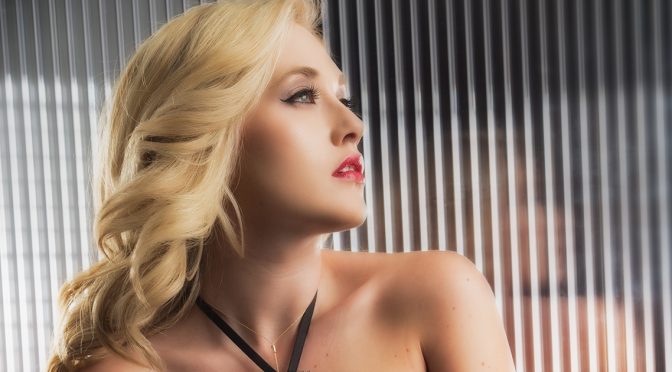
For this image, it was originally shot against a green backdrop.

For this quick example, I intentionally did not do any super dramatic changes, like totally substituting a different background. These are just some super quick edits all made within about 3 minutes max.

Here are the steps I used in Photoshop:
(You’ll have to know a bit of Photoshop terminology for this to really make sense. 🙂 )

  1. I used the menu item Image -> Adjustments -> Replace Color command. Then after I used the eyedropper to select the green background I simply shifted the Hue and Luminance sliders until I achieved the color I wanted.
  2. I just did a few quick edits to remove one of the catch lights in her eyes using the Brush tool, and then some quick Clone Stamp edits to clean up a few hairs, followed by a tiny amount of small cleanup of very minor blemishes using the Healing Brush (her skin is amazing anyway though!).
  3. Finally I created an Adjustment Layer (choose any type, really) and change its Blend Mode to Multiply. Then I used a black brush on the Layer Mask to removed the effect of that layer mostly in around the top half of her body to provide a nice vignette.  That’s all!

Share

Kevin Gourley Photography Workshops, Austin, TX – Austin Photography Classes